How to Import Your Tabs from Toby or Workona to CloseTab
Switching tab managers doesn't have to be painful. CloseTab has built-in import tools for both Toby and Workona, so you can bring all your saved tabs, collections, and workspaces over in under 2 minutes. No tabs lost, no manual copy-pasting.
Importing from Toby
Toby stores your collections as a text file. Here's how to export from Toby and import into CloseTab:
1 Export your Toby data
Open Toby and go to your Toby settings. Look for the Export option. Toby will generate a .txt file containing all your collections and their URLs.
2 Open CloseTab's import dialog
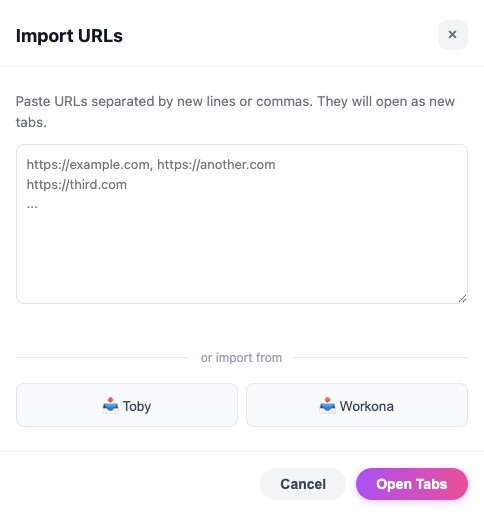
In the CloseTab dashboard, click the Import button in the sidebar. You'll see the Import URLs dialog with buttons for Toby and Workona at the bottom.
3 Click the Toby button
Click the Toby button to open the Toby import modal. You can either drag and drop your .txt file onto the drop zone, or click to browse and select it.
4 Preview and import
CloseTab will parse the file and show you a preview of all the collections it found, including how many tabs are in each one. Each Toby collection becomes a CloseTab project with all its tabs preserved. Click Import Projects to finish.
That's it! All your Toby collections are now CloseTab projects, ready to open, organize, and use with focus mode.
Importing from Workona
Workona exports your workspaces as a JSON file. The process is just as simple:
1 Export your Workona data
In Workona, go to Settings and find the Export option. Download the .json export file. This contains all your workspaces, sections, and saved tabs.
2 Open CloseTab's import dialog
In the CloseTab dashboard, click the Import button and then click the Workona button at the bottom of the dialog.
3 Drop your JSON file
Drag and drop the .json file onto the drop zone, or click to browse and select it.
4 Preview and import
CloseTab will parse the Workona export and show you a preview. Here's how your data maps over:
- Workona workspaces become CloseTab projects
- Workona sections/groups become CloseTab groups within each project
- All tabs within each group are preserved with their titles and URLs
Click Import Projects and you're done. Your entire Workona workspace structure is now in CloseTab.
You Can Also Paste URLs Directly
Don't use Toby or Workona? No problem. The same import dialog lets you paste URLs directly - separated by commas or new lines. This works for importing tabs from any source: a spreadsheet, a text file, a Slack message, or anywhere else you've saved links.
What Happens After Import?
Once your tabs are imported into CloseTab, you can:
- Organize - Drag tabs between groups, rename projects, add emoji icons
- Open as tab groups - Click a group to open all its tabs as a color-coded Chrome tab group
- Focus - Switch to Focus Mode with a Pomodoro timer and site blocker
- Search - Find any saved tab instantly across all your projects
CloseTab is designed to be a drop-in replacement for Toby and Workona, with added focus and productivity features that neither of them offer.
Ready to Switch?
Install CloseTab for free, export your data from Toby or Workona, and import it in seconds. Your tabs will feel right at home.