Best Workona Alternative for 2026: Why CloseTab Is the Smarter Choice
If you're looking for a Workona alternative, you're probably frustrated with tab overload and looking for a better way to organize your browser. Workona has been a popular tab manager, but it's not the only option - and it may not be the best one for how you actually work.
In this post, we'll compare CloseTab vs Workona across the features that matter most: tab management, focus tools, pricing, and the overall experience.
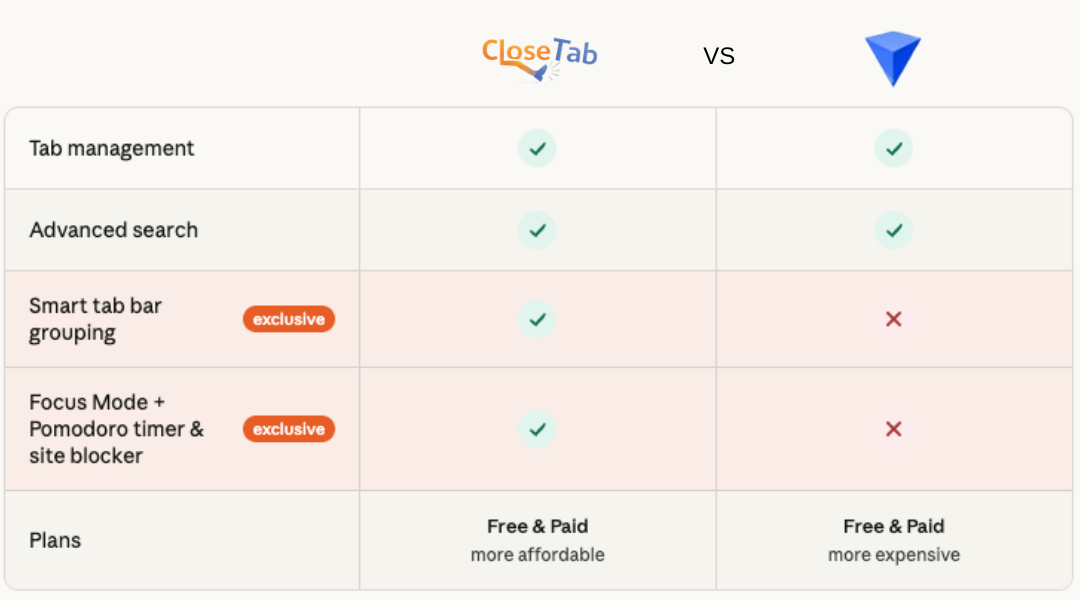
Feature Comparison: CloseTab vs Workona
Where CloseTab Stands Out
1. Smart Tab Bar Grouping
CloseTab doesn't just save your tabs - it organizes them directly in Chrome's tab bar using native tab groups. When you open a project, your tabs appear color-coded and grouped in the tab bar, making it easy to switch between contexts without losing your place. Workona doesn't offer this level of integration with Chrome's built-in tab grouping.
2. Built-in Focus Mode with Pomodoro Timer
CloseTab goes beyond tab management. It includes a full Focus Mode with a customizable Pomodoro timer, helping you structure your work sessions and breaks. This is something Workona simply doesn't have - you'd need a separate app or extension for time management.
3. Site Blocker
Distractions are the enemy of deep work. CloseTab's built-in site blocker lets you block distracting websites during focus sessions. No need to install yet another extension - it's all integrated into one tool.
4. Focus Music with Spotify
CloseTab connects to your Spotify account so you can control your focus music directly from the focus dashboard. Play curated focus playlists, pause when you take a break, and auto-play when your timer starts. It's a small touch that makes a big difference in your workflow.
5. Google Calendar Integration
See your upcoming events right on the focus dashboard. CloseTab connects to Google Calendar and shows your next meeting or event, so you always know what's coming up without switching tabs. You can even set reminders to get a chime one minute before events start.
6. More Affordable Pricing
Both CloseTab and Workona offer free tiers, but when it comes to paid plans, CloseTab is significantly more affordable. You get more features for less money, including a lifetime plan option that Workona doesn't offer.
What Both Tools Do Well
To be fair, both CloseTab and Workona handle the basics of tab management well:
- Tab saving and organizing - Save open tabs into project folders for later
- Advanced search - Quickly find tabs across all your projects
- Cross-session persistence - Your saved tabs survive browser restarts
If all you need is basic tab storage, either tool works. But if you want a complete productivity workspace that helps you focus as well as organize, CloseTab is the clear winner.
Who Should Switch to CloseTab?
CloseTab is ideal if you:
- Have 50+ tabs open and need to organize them by project
- Want focus tools (timer, site blocker, music) built into your tab manager
- Use Chrome tab groups and want them to sync with your saved projects
- Want a more affordable alternative to Workona's paid plans
- Prefer an all-in-one productivity tool over installing multiple extensions
Try CloseTab for Free
CloseTab is free to install and use. The free plan includes up to 5 projects, focus timer (1 hour per day), and site blocking. Upgrade to Pro for unlimited everything, or grab the limited-time Lifetime plan to pay once and use forever.